
A fake door test presents an entry point to a feature before the feature exists, then measures whether eligible users try it. A useful test defines who can see the entry point, what happens after a click, how unique exposure is counted, and what follow-up evidence would justify building. A click is an interest signal, not a completed use or purchase.
Start with a decision about a specific feature
A small reporting product is considering Export PDF so account managers can share weekly reports with clients. CSV export already works. The question is whether people who have produced a report show enough interest in PDF sharing to justify interviewing them and testing a small first version. It is not whether every visitor likes the idea of exporting.
Place the test in the report’s Export menu, where the feature would actually live. Show it only to eligible account managers with a populated report. A homepage banner promising a free PDF tool would reach a different audience and could not answer the same question.
Before release, write the decision rule with the product owner. For this example, the next step is a limited discovery round if at least five distinct exposed users request a launch notification within the planned week. Five is this team’s pre-agreed trigger for investing in more research, not an industry benchmark, an interview recruitment count, or proof that development will pay off.
Write the complete experience after the click
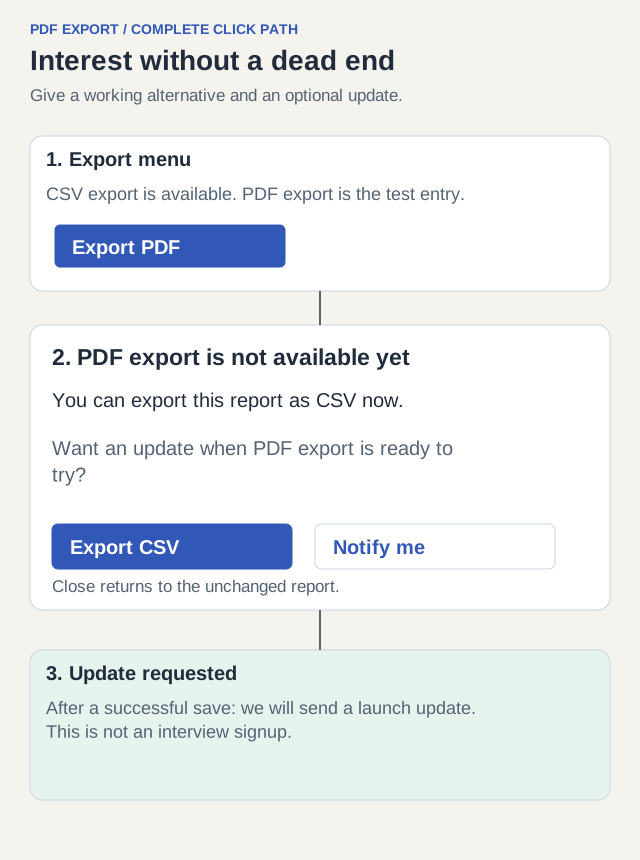
The entry point says Export PDF. The next screen immediately explains that the capability is not available, gives an existing alternative, and offers an optional way to hear about it. Do not make the user wait for a fake progress bar or repeatedly attempt a download that will never arrive.
Use this copy: PDF export is not available yet. You can export this report as CSV now. Want an update when PDF export is ready to try? The two actions are Export CSV and Notify me. Close returns to the same report with filters intact. A notification request should confirm the request, not pretend a PDF was generated.
| State | Required behavior | Check |
|---|---|---|
| Export menu | PDF entry appears only in the intended report context | An empty report and an ineligible account do not record eligible exposure |
| Feature unavailable | Explain immediately; offer working CSV and Close | CSV exports the original report; Close preserves filters |
| Optional notification | Explain the update purpose and allow skipping | No preselected consent or compulsory email to continue using the report |
| Request saved | Confirm notification request only after successful save | Failure retains entered information and offers retry without claiming success |
Define events before interpreting a percentage
Count people, not menu opens. Assign a stable experiment variant and test window; use your existing privacy-appropriate user identifier. A person who sees the menu five times still contributes one exposed user to the main denominator. Deduplicate clicks and notification requests in the same way.
For this test, exposure means the PDF item became visible in an opened Export menu for an eligible user with a populated report. Loading a report without opening the menu is not exposure. Keep report viewers as a separate reach metric if the team also wants to know how discoverable Export is.
| Event | Fire when | Record / interpretation |
|---|---|---|
| pdf_door_exposed | The eligible PDF menu item is visibly shown | Experiment ID, variant, eligible user ID, time; deduplicate per user and window |
| pdf_door_clicked | The exposed user activates Export PDF | Same experiment/variant/user identifiers; count distinct users |
| pdf_notify_requested | An optional notification request is successfully saved | Same identifiers; successful saves only, not button taps |
| pdf_csv_alternative_used | The existing CSV export is initiated after the unavailable state | Track separately; not evidence of PDF feature use |
| pdf_door_dismissed | The user closes the unavailable state | Useful context; not automatically dissatisfaction |
Read a result without changing the denominator
Worked result: 200 distinct eligible users saw the PDF item during the planned window; 18 clicked it; six requested an update. The exposed-user click rate is 18 divided by 200, or 9%. Notification requests represent 6 divided by 200, or 3% of exposed users. Among clickers, six out of 18 requested an update, approximately 33%. These are different questions and need different denominators.
Exclude staff/test accounts and known automated activity using rules set before inspecting the outcome. Keep one stable variant per user, and verify that successful notification saves join back to an eligible exposure. A user who appears only in the save event may indicate missing instrumentation or a second entry path; investigate instead of silently counting them.
Do not compare this 9% with another test’s percentage if placement, audience, feature promise, or exposure definition differs. Small samples also move sharply with a few people. Inspect who clicked and what job they expected to accomplish before interpreting a decimal as a firm investment decision.
| Observation | Supported interpretation | Still unknown |
|---|---|---|
| 18 of 200 exposed users clicked | Some eligible report users tried this entry point | Whether the completed PDF would solve their sharing problem |
| 6 of 200 requested an update | Six people requested launch updates; they have not agreed to interviews | Whether they will try, reuse, or pay for the feature |
| Team’s five-notification research-investment rule was met | Allocate a discovery round and recruit willing research participants separately | Whether building a production export is worthwhile |
Use the result to choose the next experiment
Recruit research participants separately; launch-notification consent does not grant consent to an interview. Ask willing participants to walk through a recent client-report handoff: who received it, what format was needed, which content was missing, and what workaround they used. This may reveal that scheduled delivery matters more than PDF, or that branding and selected pages are necessary for a usable first version.
For the example result, the decision is to explore the sharing task with willing participants and prototype one report-to-PDF output. It is not to ship a general document editor. Bring a sample report and ask whether the recipient can find the decision and supporting figures; a format preference alone is not task success.
| Observed situation | Next action | Why |
|---|---|---|
| Exposure was low or logging is incomplete | Check visibility and instrumentation; run a valid window | No reliable test of interest occurred |
| Clicks occur but few follow-up requests | Examine promise, post-click friction, and actual task in research | Low signup can have several explanations |
| The planned notification threshold is met | Fund a bounded study; separately recruit participants and test the output | Interest justifies learning, not full implementation |
| People expect a different feature from the label | Revise the promise and test again | The original clicks measure a different expectation |
Copy a brief that includes the stopping point
Use these fields for the next test: audience; job; entry placement; exact promise; unavailable-state copy; existing alternative; exposure definition; exclusion rules; test dates; primary measure; follow-up decision rule; owner; rollback condition. Specify the end date so an unsupported menu item does not remain indefinitely.
Filled brief: Account managers with populated reports; share a weekly report with a client; PDF item in Export; immediate unavailable explanation with CSV alternative; unique visible menu exposures; one week; distinct notification requests; at least five launch-notification requests triggers investment in a separately recruited research round; product owner reviews requests and support reports daily. Stop early if the fake entry blocks the existing export or creates a serious misleading expectation.
Amplitude’s guide covers placement, transparent follow-up, audience selection, and metrics. Use that structure, but keep your conclusion narrower than “people clicked, therefore demand is proven.” The decision becomes useful when the next experiment tests whether the promised output actually solves the user’s work.