
Task analysis studies what a person must do to achieve a goal, including inputs, decisions, order, and interruptions. To use it in UX, observe a real task, break it into meaningful subtasks, and trace a design change back to a specific obstacle. A list of screens is not a task analysis.
Define the goal before naming the screens
An employee wants an eligible train expense reimbursed. The current claim has been returned because its project code is missing. The employee’s immediate goal is to correct and resubmit that claim without losing the receipt, amount, or link to the original submission. Fill in the form is only one step toward that goal.
Bound the analysis to the employee’s correction task. Manager approval and finance payment matter as dependencies, but mapping every department would turn this into a wider workflow or service-blueprint exercise. Record where the employee depends on another role and keep their own actions in the main hierarchy.
Collect the sequence and the reasons for it
Observe an employee correcting a returned claim using a suitable test or consented, redacted example. Ask them to explain a decision after it occurs: What told you which field needed changing? Where did you find that project code? Avoid instructing them to open a screen you expect them to use.
NN/g distinguishes gathering information from analyzing it. Interviews and simulations can help, but watching the work may reveal documents, interruptions, and workarounds that a summary misses. Capture those inputs instead of replacing the observed process with an ideal flow.
| Moment | Example action / obstacle | Input or decision | Question for the analyst |
|---|---|---|---|
| Reads notification | Sees Claim returned but no reason | Needs to locate the rejected claim | Is the message linked to the exact claim? |
| Opens claim | Receipt and amount are present; project field is blank | Must identify the required correction | Is the return reason attached to that field? |
| Finds project code | Leaves the app to check the project directory | Must select a valid code, not free text | Can the interface provide the same authoritative choices? |
| Resubmits | Checks whether another receipt upload is required | Must distinguish correction from creating a new claim | Are unchanged attachments preserved? |
| Checks result | Looks for confirmation that review restarted | Needs current status and original claim reference | Does resubmission keep the same identity? |
Build a hierarchy with an explicit plan
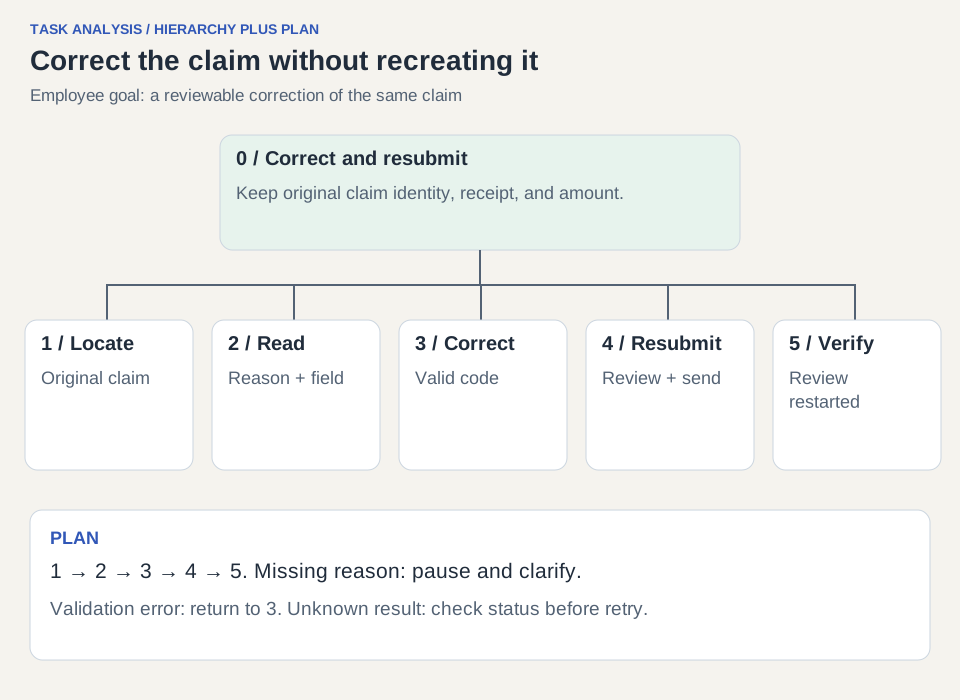
The diagram and numbered table describe the same goal. A hierarchy tells you what belongs inside a task; the plan tells you when and under what conditions to perform each part. Keep both. Without a plan, a tree can look complete while leaving the order of correction and resubmission ambiguous.
Plan for task 0: do 1, then 2. If the return reason cannot be identified, contact the reviewer and pause. Do 3 only for the fields that need correction. Do 4; if validation reports another problem, return to the relevant part of 3. Finish with 5 after a successful resubmission. A network-uncertain result requires checking status before another attempt.
| Task ID | Action or subgoal | Input / output |
|---|---|---|
| 0 | Correct and resubmit the returned train-expense claim | Returned claim becomes a reviewable correction |
| 1 | Locate the returned claim | Notification or claim list gives the original claim ID |
| 2 | Understand why the claim was returned | Return reason and affected information are identified |
| 2.1 | Read the return reason | Identify Missing project code |
| 2.2 | Locate the affected field | Project field is associated with that reason |
| 3 | Correct the required information | Apply the change without recreating the claim |
| 3.1 | Find an eligible project code | Consult authoritative project list |
| 3.2 | Apply the code; preserve unchanged information | Claim still contains the original amount and receipt |
| 4 | Review and resubmit | Corrected claim is sent back for review |
| 4.1 | Review the corrected claim | Check changed and retained information |
| 4.2 | Resubmit and handle validation | Successful request or a specific correction loop |
| 5 | Verify the resulting claim status | Same claim ID; submitted for review, not paid |
Separate decisions from mechanical actions
Clicking a project selector is not the hard part if the employee does not know which project can reimburse the trip. Record the knowledge needed to make the choice. A searchable control can reduce typing, but it cannot resolve an ambiguous policy by itself.
Use the table to distinguish a UI repair from a missing organizational rule. If two projects could apply and the directory provides no explanation, the next action is to clarify that rule with the owner. Do not make the interface silently choose a project just to remove a step.
| Decision | Information needed | Interface support | Outside the interface |
|---|---|---|---|
| Which claim needs correction? | Claim reference and return status | Deep link and identifiable claim summary | Notification delivery |
| What must change? | Specific reason and affected field | Reason beside project field; retain overall context | Reviewer supplies an actionable reason |
| Which project is valid? | Authoritative eligible codes and meanings | Searchable list with identifying labels | Project ownership / expense policy |
| Did resubmission work? | Recorded result for this claim | Same ID and updated review status | Reliable service response and reconciliation |
Translate one obstacle into a visible repair
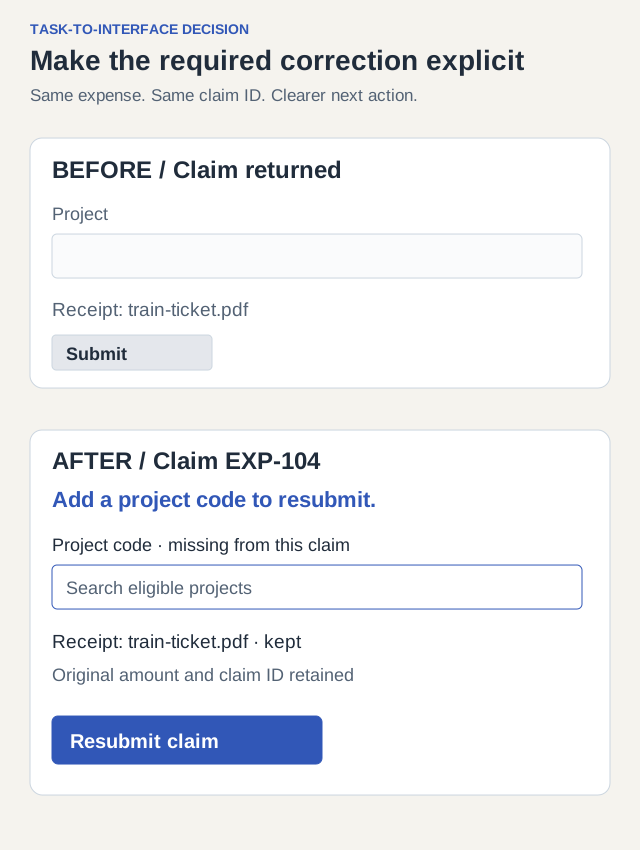
Original design: the notification says Claim returned; the form shows a blank project field without explanation; a generic Submit action gives no indication whether this is a new claim or a correction. Proposed design: the notification links to claim EXP-104, the page says Add a project code to resubmit, and the unchanged receipt and amount remain visible.
The main action becomes Resubmit claim. After a confirmed success, show Claim EXP-104 resubmitted for review. This wording reflects the employee’s task and the actual state. It must not say Reimbursed, because finance has not paid the claim.
Notice what was not necessary: a dashboard redesign, a new onboarding flow, or a general AI assistant. The task analysis isolates a small repair with a clear input, decision, and result.
Verify the task, including interruption and failure
Run the original correction scenario on the changed interface. Use test data and a known returned claim. Record whether the employee can identify the required change, find a valid code, preserve the receipt, and explain the resulting status. Do not count successful button activation as successful reimbursement.
Also interrupt the task at a realistic point: leave to consult the project directory, then return. Check whether work and context survive according to the product’s stated save behavior. A perfect uninterrupted demo can hide the obstacle that caused the original rework.
| Condition | Expected result |
|---|---|
| Returned claim opened | Exact return reason and affected project field are identifiable |
| Valid project selected | Original receipt, amount, and claim ID remain unchanged |
| Invalid or missing code submitted | Specific validation explains the correction; other data remains |
| Employee leaves and returns | Saved state is restored or unsaved-work behavior is clearly explained |
| Resubmission confirmed | Status says review restarted for EXP-104; no duplicate claim |
| Response outcome uncertain | Check current claim status before inviting another submission |
Keep a reusable task-analysis record
Copy these fields for another task: user role; goal; start and end conditions; observation references; task hierarchy; ordering plan; decisions and required knowledge; external dependencies; observed obstacles; proposed changes; acceptance checks. Add version and date so someone can relate the analysis to the interface studied.
For this example, the finished record should let a teammate explain why the return reason belongs beside the project field, why the receipt must survive correction, and why the result says resubmitted rather than reimbursed. If a proposed feature cannot be traced to a task need or evidence, revisit its justification before implementing it.