
A paper prototype is an interface that a person operates by swapping screens and overlays in response to a participant’s actions. To run a useful test, prepare the task, screen states, transition rules, and observation sheet before the session. The goal is to learn which design decision to change, not whether people like the drawings.
Learn from a real paper-prototype project
In NN/g’s account of the Mozilla Support redesign, the team printed interface designs and watched Firefox users try to find help. Early versions offered task and product routes; later versions put product selection before task navigation because the available tasks differed between products. Testing also exposed labels that were too general or too specific.
The lesson is a specific design decision: match navigation order to the information people need to narrow their choices. The team could change that structure before committing to HTML. The case also reports that colored, high-fidelity fragments attracted too much attention within grayscale prototypes. Keep the visual treatment consistent when the study is about labels or structure.
Prepare a task that fits on a small screen set
For a worked exercise, use a library collection service. A member wants to reserve The Secret Garden for collection at Central Library on Saturday. The first branch has no Saturday pickup slots at Central; Riverside has one at 10:00. We want to learn whether the member can change the branch and still understand where and when to collect.
Write the situation on a separate task card: You want to collect The Secret Garden on Saturday. Central is your usual branch, but you can travel to Riverside. Reserve a copy using the supplied test member number. Do not include button names or tell the participant which branch will work.
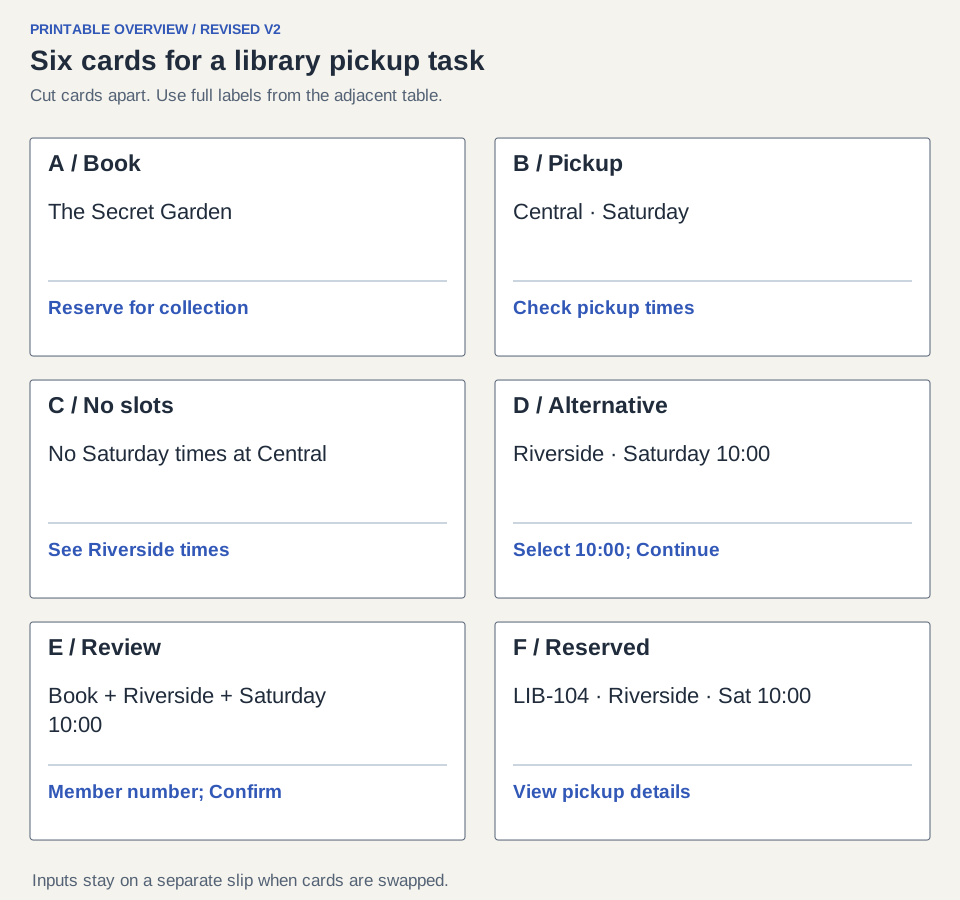
Print or redraw the revised version-two cards below. They incorporate the wording and summary changes discussed later. The compact sheet shows their layout; the table gives the exact text and controls to put on each card. Cut out the cards and make separate overlays for the unavailable and missing-number states.
| Card | Visible content | Controls |
|---|---|---|
| A — Book | The Secret Garden; Reserve for collection | Reserve for collection |
| B — Pickup | Book title; Central selected; Saturday selected | Central and Saturday fixed for this task; Check pickup times |
| C — No slots | No Saturday pickup times at Central. Try another branch. Keep book and day visible. | See Riverside times; Change day |
| D — Alternative | Riverside selected; Saturday 10:00 available; same book | Select 10:00; Continue |
| E — Review | The Secret Garden; Riverside; Saturday 10:00; member number field | Confirm reservation; Change pickup |
| F — Confirmation | Reserved. Reference LIB-104. Collect at Riverside on Saturday at 10:00. | View pickup details |
Agree how the human computer responds
Use three roles if possible: participant, facilitator, and person operating the paper. A separate observer can take notes, or the facilitator can record notes with permission. The operator follows the map and swaps a card when the participant points to a control. They do not explain the intended route or invent a more helpful response halfway through the test.
Opening script: These sheets represent a collection service. Point to what you would select and write in a field when you would type. I will change the screen to show the result. We are checking the design, and you can stop at any time. Please use the test member number rather than your own details.
If someone touches an unprepared control, say That part is not available in this prototype, record the attempted action, and ask what they expected. Do not count the missing branch as participant failure. If it is necessary to the task, add the branch before the next session.
| Current card and action | Show next | Rule |
|---|---|---|
| A: Reserve for collection | B | Central and Saturday begin selected |
| B: Check pickup times | C | This exercise returns no Central slots |
| C: See Riverside times | D | Show Riverside times; keep Saturday and book |
| C: Change day | Record an unprepared branch | Ask expected next step; do not force Riverside |
| D: select 10:00, Continue | E | Carry Riverside, Saturday and 10:00 into summary |
| E: Confirm without member number | Missing-number overlay on E | Keep pickup details and explain required field |
| E: Change pickup | D | Preserve member number on a separate input slip |
| E: Confirm with test member number | F | Show reference and the exact reviewed pickup details |
Observe the decision instead of coaching the route
After showing the task, let the participant proceed. If they pause, ask What are you looking for? rather than Have you tried Change branch? Record actions and wording. A participant who chooses another day may be expressing a genuine preference; the task has not required Riverside at any cost.
At the end ask Where and when would you collect the book? Compare the answer with the confirmation. Reaching card F is not sufficient if the member still believes the pickup is at Central. If the operator accidentally shows the wrong summary, mark the run as affected by the test material.
| Moment | Example observation | Interpretation to investigate | Revision |
|---|---|---|---|
| Card C | Participant asks whether the book itself is unavailable | The message may blur book availability and pickup capacity | Say No Saturday pickup times at Central; keep the title visible |
| Card E | Participant says Central despite selecting Riverside | The changed branch is not prominent enough | Put branch, day and time together immediately above Confirm |
| Card F | Participant correctly names Riverside and Saturday 10:00 | This run supports comprehension of the final summary | Keep the summary; check it with further participants |
Make a visible before-and-after change
The rows above illustrate observations from version one: its unavailable message was vague and its review summary buried the pickup branch. The supplied version-two cards already contain the proposed repairs. For your own sessions, replace them with what actually happened. Choose one concrete change: replace a vague Unavailable message with the branch-and-day explanation, and move the pickup summary above confirmation. Keep unrelated labels and steps stable so the next test addresses the repair.
Before: Unavailable. Try again. After: No Saturday pickup times at Central. Your book and day are still selected. Choose another branch to see pickup times. The second version identifies the unavailable resource, preserves context, and offers an action. It still needs testing; the wording is a design proposal, not a measured improvement.
Run the same situation with the revised cards and new participants where possible. Compare the specific misunderstanding, not how attractive they find the paper. Reusing the same person can be helpful for feedback, but their knowledge of the route changes what a second attempt tells you.
Take the result into a digital prototype
Keep a short session record: prototype version, task, starting card, participant code, actual action, exact words, operator deviation, final branch/time answer, proposed change, and next check. Make one record per important observation, not one overall good/bad rating.
Paper is useful for exploring labels, grouping, order, and basic recovery. Move into a digital prototype when the unresolved question depends on scrolling, keyboard focus, responsive layout, or system timing. Carry the revised labels and transition rules into that prototype so the team does not lose what it learned.
Before you finish, ask another person to operate the cards using only the transition table. If they need you to explain a hidden rule, the materials are incomplete. A runnable set of cards and a justified design change are the deliverables; a photograph of sticky notes is not enough.