
Low fidelity and high fidelity describe how closely a prototype represents the intended experience. Choose fidelity separately for content, appearance, and interaction. For example, a rough appointment screen may be sufficient if its status wording and recovery paths are realistic; beautiful screens with missing branches can answer less.
Use fidelity to protect the question you are testing
A clinic wants to know whether visitors understand that requesting an appointment does not immediately confirm it. This example tests status comprehension, not clinical advice or scheduling accuracy. A visitor chooses Tuesday 09:00 and sends a request; a receptionist later accepts it or offers Wednesday 11:00. The first design decision is which parts must behave realistically for that question.
If the prototype ends with a generic success tick, participants may reasonably believe the appointment is confirmed. Making the screen more attractive will not fix the invalid test. Keep the words Appointment requested, the selected date, and the next expected action visible even in the rough version.
Compare the same state at two visual fidelities
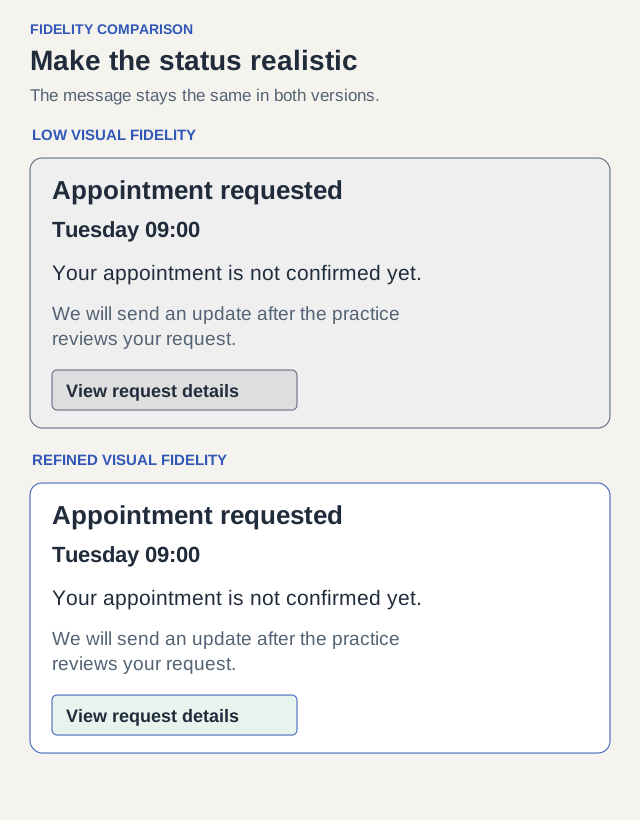
The rough version uses plain boxes but includes the real status copy: Appointment requested for Tuesday 09:00. Your appointment is not confirmed yet. We will send an update after the practice reviews your request. The refined version uses the proposed typography, spacing, icons, and mobile layout, but preserves the same meaning.
The gray version can already reveal whether someone plans to attend before receiving confirmation. The refined version can reveal additional problems: a green check might overpower the pending wording, a small status label may be missed, or a narrow viewport may hide the follow-up instructions. Those are reasons to increase visual fidelity for this question.
Set a fidelity budget before building
NN/g describes fidelity in terms of visual design, content, and interactivity. Treat these as independent choices. For this appointment study, realistic status language and connected follow-up states matter more than a final logo or animated calendar.
A fidelity budget records what you will make real, what you will simplify, and why. It prevents a team from spending an afternoon polishing a banner while leaving the crucial alternative-time branch untestable.
| Dimension | Required for this study | Can stay simplified | Reason |
|---|---|---|---|
| Content | Exact requested / confirmed / alternative-time wording; real-looking dates | Practice biography and marketing text | The question is what the status means |
| Interaction | Request, review a follow-up, accept an alternative, see final status | Live calendar, email delivery and account creation | The participant must distinguish a request from a confirmed appointment |
| Visuals | Readable hierarchy; distinct status headings; phone-width layout | Final photography and decorative animation | Status must be noticeable without brand polish |
| Data | A fixed request ID and consistent date across screens | Real patient data and inventory integration | State continuity matters; private records do not |
| Timing | Explicitly staged receptionist response | Real waiting time | This session tests comprehension, not tolerance for a long wait |
Build the paths that could change the interpretation
Prepare three outcomes. First, the practice confirms Tuesday. Second, it offers Wednesday but waits for the visitor to accept. Third, the visitor declines Wednesday and the request remains unresolved or is canceled according to the stated policy. Do not silently turn an offer into a confirmed appointment.
Use a facilitator cue such as We are now showing the update you would receive later to compress the wait. Record that this is a staged transition. A short session with an accelerated response cannot tell you how someone behaves after hours without an update.
| State | Exact example heading | What the visitor can do |
|---|---|---|
| Request submitted | Appointment requested — awaiting review | Review the requested time; wait for an update |
| Receptionist accepts Tuesday | Appointment confirmed: Tuesday 09:00 | Review appointment details |
| Receptionist offers Wednesday | Another time is available: Wednesday 11:00 | Accept or decline; no confirmation yet |
| Visitor accepts Wednesday; service confirms | Appointment confirmed: Wednesday 11:00 | Review the new confirmed time |
| Visitor declines | Alternative declined — no appointment confirmed | Choose another time or end the request |
Run the same task and record what caused the answer
Give the visitor this task: You would like an appointment next week and can attend Tuesday morning or Wednesday morning. Make the request, then use the update you receive to decide what to do next. Do not tell them to look for a pending label. After submission, ask: What do you think happens next? Later ask which time, if any, they believe is confirmed.
Record the words they use and the part of the interface they refer to. If the visitor says Tuesday is confirmed because of a check icon, that is a concrete reason to revise the visual status treatment. If they cannot open the follow-up because the link is missing, repair the prototype rather than interpreting it as a product comprehension problem.
| What happens | Likely problem to investigate | Next version |
|---|---|---|
| Visitor reads the pending text but calls it confirmed | Wording or workflow expectation | Change the explanation and retest the same rough state |
| Visitor misses pending wording under a large green tick | Visual hierarchy or conflicting signal | Use a refined status treatment with the same content |
| Visitor wants to decline the offered time but cannot | Missing interaction branch | Add decline and its result before further testing |
| Visitor understands every status but asks about waiting overnight | The study has not tested long delays | Use a separate realistic follow-up study, not extra visual polish |
Hand off a specific decision instead of a fidelity label
Write the handoff as: Keep the simple page structure. Use realistic request, offer, and confirmation language. Implement accept and decline with distinct result states. Increase visual fidelity only for the status panel and phone layout. This is much more actionable than Make it high fidelity.
For another project, copy these fields into your brief: task; uncertain decision; content that must be exact; required branches; visuals that could affect interpretation; simulated behavior; evidence to collect; reason to increase fidelity. Complete the fields before generating more screens.
You are ready for the study when a dry run can reach every planned outcome, the same appointment details survive each transition, and a reviewer can tell which states remain simulated. You are ready for implementation when the chosen behavior and its acceptance conditions are clear; a high-fidelity prototype alone is not proof that the live service works.