
A wireframe helps you decide what information belongs where. A mockup lets you inspect a proposed visual treatment. A prototype lets someone attempt a task and reveals what happens after an action. Choose the deliverable for the unresolved question: you do not need to produce all three in sequence.
Start with one booking problem
Imagine a small ceramics studio offering a two-hour introductory workshop. Visitors need to choose a session, see the price, enter contact details, and reserve one place. The design problem is specific: people must be able to tell which session they are booking and recover if it fills before confirmation. We will use this worked example for all three deliverables.
Fix the same content before comparing drawings: Saturday 10:00, Sunday 14:00, $45 per person, name, email, and a Reserve a place action. A successful reservation ends with the selected date and a booking reference. A capacity rejection ends with no reservation, preserved contact details, and an explicit alternative. Keeping the task constant makes differences between the artifacts useful.
Wireframe: decide what the page must communicate
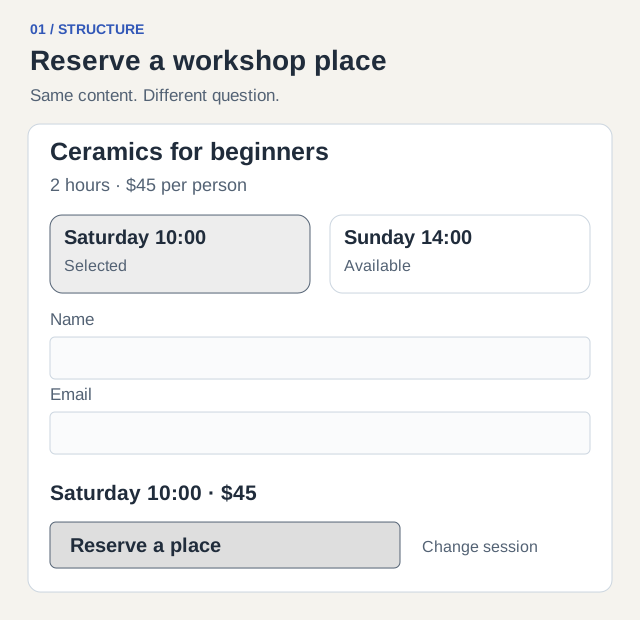
Put the workshop name and price above the session choices. Show the chosen date again beside the reservation action, so the visitor can check it without remembering the previous screen. Group name and email together because both belong to the booking, rather than scattering them between promotional sections. Those are structural decisions; they do not require a final font or palette.
The wireframe below has a session list, contact fields, and a booking summary. Use real labels even while boxes remain gray. A placeholder such as Button cannot reveal whether Reserve a place sounds like a commitment or merely opens another step. For a quick check, ask a colleague to point to the cost, available date, and information needed to continue. If they cannot, revise hierarchy before styling.
Mockup: make the proposed visual choices inspectable
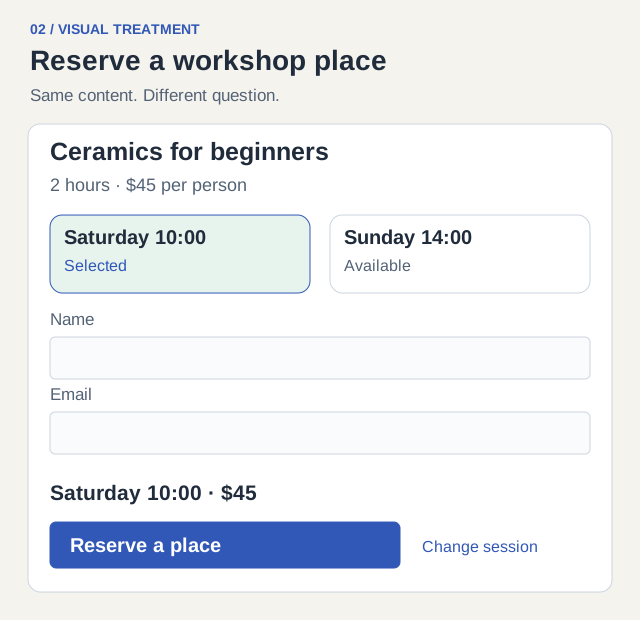
Keep the wireframe content and apply a visual treatment. In this example the selected Saturday card has both a border and a Selected label. The $45 price remains near the session summary, while the primary action has stronger contrast than the secondary Change session link. An unavailable slot needs its own treatment rather than simply a paler version of an available choice.
Now review actual typography, spacing, focus appearance, and narrow-screen wrapping. The date should remain legible at mobile width; the selected state should not depend on color alone. A polished static screen still cannot tell you whether input survives a failed request. Document that as a behavior question for the prototype rather than judging it from a screenshot.
Prototype: connect the states that decide whether the task works
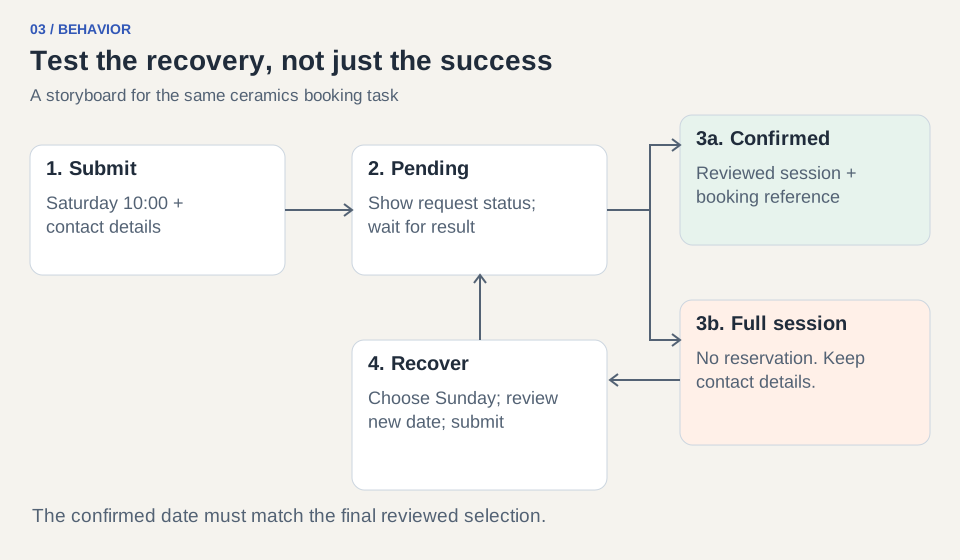
Build only the branches needed to explore this booking question. Start with Saturday selected and contact fields empty. Let the visitor enter test details and submit. For one run return confirmation; for another return a full-session response. After that rejection, allow Sunday to be selected without erasing contact input, require the visitor to review the changed date, and then confirm Sunday.
The prototype may be clickable screens, paper operated by a facilitator, or code. The deciding property is that someone can attempt the sequence. It does not need live payments, a real inventory service, or production email to answer this particular question. Record which branches are simulated so collaborators know what must still be implemented.
| Starting state | Action or result | Next state |
|---|---|---|
| Saturday selected; empty contact fields | Submit without email | Explain missing email beside its field; keep the session |
| Saturday selected; valid test details | Submit | Show that the reservation is pending |
| Request pending | Confirmed reservation response | Show Saturday 10:00 and booking reference |
| Request pending | Confirmed capacity rejection | State no place was reserved; retain contact input |
| Capacity rejection | Choose Sunday and submit again | Review Sunday, then confirm Sunday only after success |
Choose the cheapest artifact that can answer the question
The names describe different jobs, not three mandatory project phases. You can sketch a structure and turn it directly into a rough interactive prototype. You can also produce a mockup of one important state while leaving the rest of the prototype visually plain. NN/g’s deliverables glossary is useful for aligning these terms with a team, but the question should decide what you produce.
Keep comparison criteria consistent: what evidence can this artifact produce, what is missing, and what would cause another iteration? Avoid deciding that a mockup is better because it looks more finished.
| Unresolved question | Start with | Evidence to collect | What it does not establish |
|---|---|---|---|
| Can people find price and available dates? | Wireframe with realistic labels | Where they look and what information they miss | Visual polish or request behavior |
| Is the selected session distinct and readable? | Mockup at desktop and phone widths | Legibility, emphasis, focus and state review | Whether a reservation is saved |
| Can someone recover when Saturday fills? | Prototype with the rejection branch | Actions, misunderstandings and final chosen date | Production inventory or delivery reliability |
| Does the live system prevent overselling? | Implemented service and integration checks | Concurrent request and inventory results | A static artifact cannot answer this |
Copy the brief and check the deliverable
Use the following brief to ask a designer or an AI tool for a useful result. Replace the workshop details, but keep the question, states, and check. When reviewing the output, walk through it yourself before bringing in participants; a dead link in the test material should not become a supposed usability finding.
Brief: Create a ceramics-workshop booking prototype for a first-time visitor. Show Saturday 10:00 and Sunday 14:00 at $45 per person, with name and email. Make Saturday become full after submission. Explain the rejection, preserve contact details, and let the visitor choose Sunday. Confirm only the session selected on the second attempt. Use the attached visual mockup for appearance; include empty, pending, rejected, and confirmed states.
Give the participant a situation rather than an interface instruction: You want a workshop place this weekend and can attend either session. Arrange a place using these test contact details. Observe which date they believe they booked and what they do after the rejection. If they think Saturday was reserved, revise the feedback and rerun the same task. If the concern is visual realism rather than artifact choice, use the fidelity guide next.