A useful website idea starts with someone trying to get something done. A client needs to decide whether your work fits their project. A diner needs to know whether they can walk in tonight. A remote team needs a meeting time that works in three cities. Those situations give you a much clearer starting point than “build a portfolio” or “make a directory.”
Below are seven real websites to study, with screenshots of the relevant interfaces. For each, we explain the design decision worth borrowing, then propose a smaller first version: who it serves, which pages and features it needs, and what to ask a visitor to try.
Website screenshots captured October 21, 2026. Each image links to its source.
Choose by the material you can bring
- Portfolio: you have finished work and want relevant client inquiries.
- Restaurant information: you can keep one real business's menu and visit details accurate.
- Curated directory: you already help a particular group choose resources.
- Recipe library: you have recipes you cook and a specific constraint to organize them around.
- Time-zone utility: you repeatedly do the same scheduling calculation.
- Event website: you have an actual gathering, confirmed details, and an organizer.
- Local repair directory: you can verify services in a small area and keep them updated.
1. A portfolio that helps a client choose you
Build for: a freelance designer, developer, or photographer whose potential clients ask, “Have you done work like mine?” The visitor needs evidence of fit before arranging a conversation.
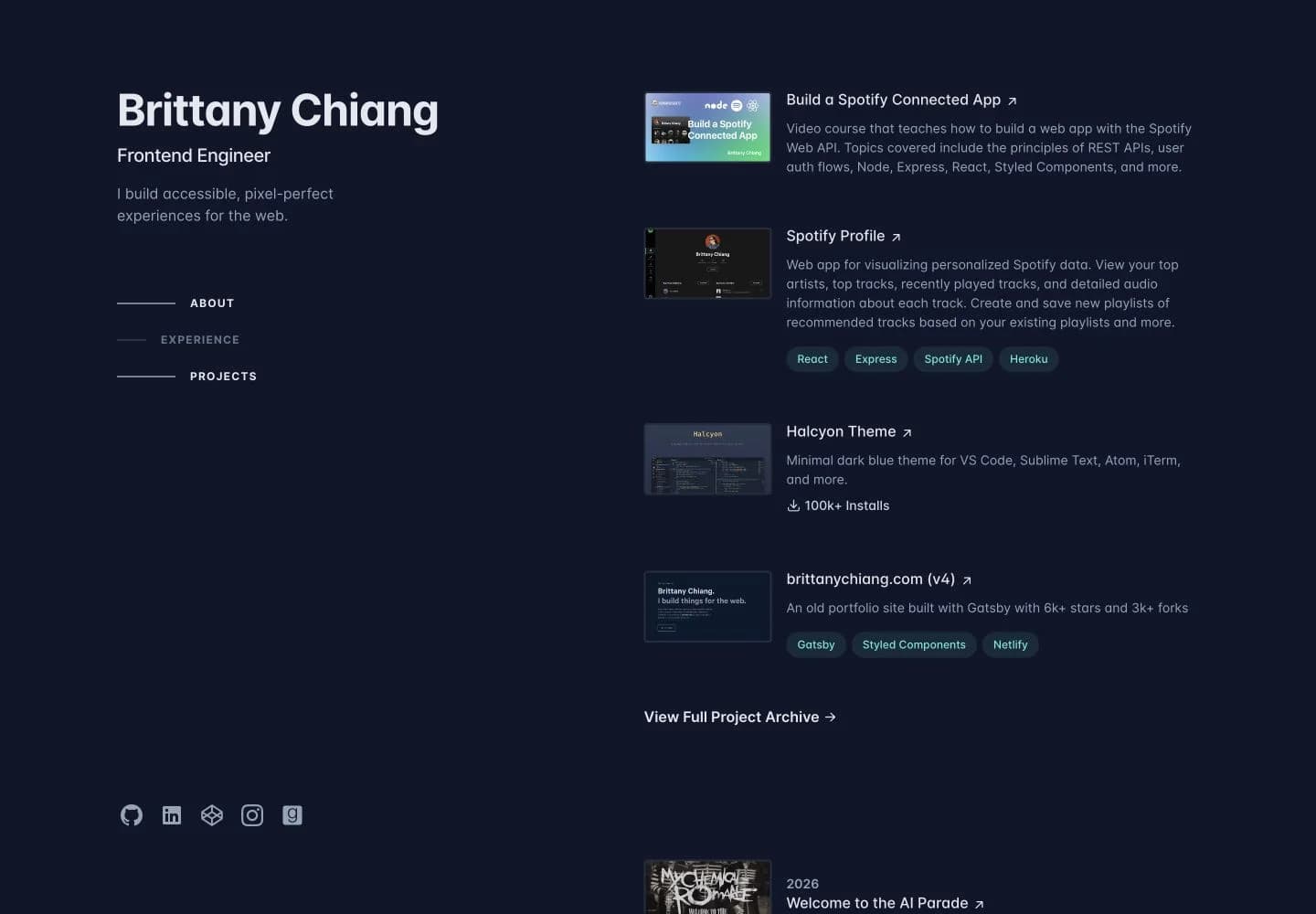
The decision to borrow: Brittany Chiang keeps her identity and specialization visible beside the work. The project list combines a small image, an explanation, and a link; technology tags add context where relevant. A reader can distinguish a course, an app, and an editor theme without opening all three. For a freelance portfolio, use that same scan-first structure to communicate your role and the kind of client problem you handle.
Your first version
- Home: name the service and customer, such as “Product photography for independent skincare brands.” Show three relevant projects with a preview, brief, and your contribution.
- Three project pages: show the original request, a constraint, the decision you made, and the delivered work. For photography, include the product detail and usage context, not six nearly identical hero shots.
- Contact: provide an email link and tell clients what to send: product, intended use, deadline, and approximate scope.
Leave out: a blog you cannot maintain, skill percentage bars, and an animation that delays access to the work. Prepare your own project material before building the layout. Check it: give a prospective client a realistic brief and ask them to find relevant work and start an inquiry. If they cannot explain your contribution, revise the project text before adding more images.
2. A restaurant site that answers the questions before a visit
Build for: a single café or restaurant whose customers keep asking about the menu, opening hours, location, and whether they need to book. The useful outcome is a confident visit, not time spent browsing a brand story.
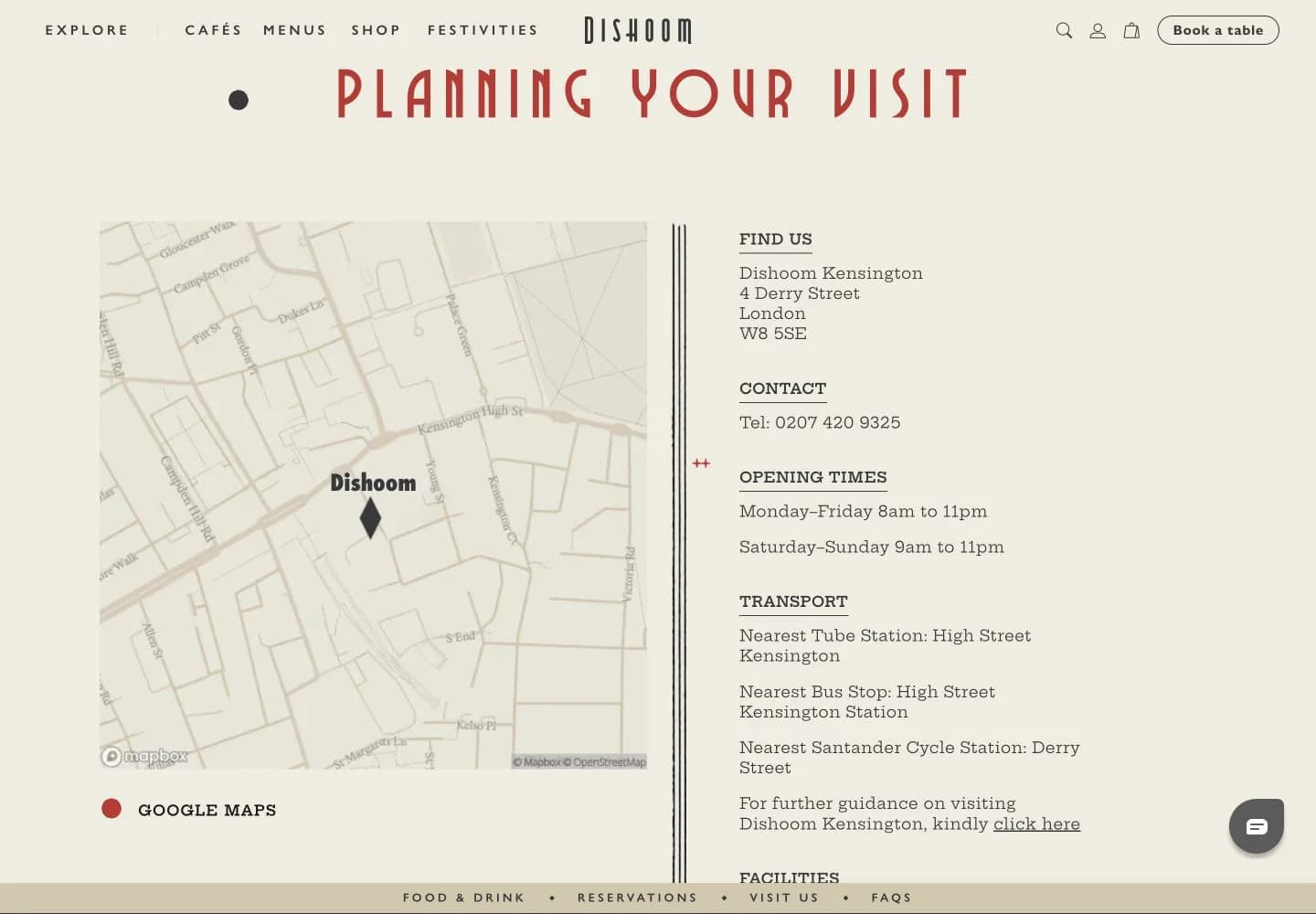
The decision to borrow: Dishoom's Kensington page separates food, reservations, and visit information with jump links. Its visit section groups the map, address, hours, and transport; its booking section explains when walk-ins or reservations apply. That grouping follows a diner's decisions. You can borrow it without reproducing the restaurant's lengthy storytelling or online store.
Your first version
- One location page: put the address, weekly hours, holiday exceptions, telephone, and directions link in a clearly labeled visit section.
- A readable menu: list dishes, descriptions, and current prices as text. If you offer a PDF too, it should not be the only way to read the menu on a phone.
- One reservation route: link to the business's existing booking service or telephone. State its real walk-in and group-booking rules beside that action.
The operating requirement: someone at the restaurant must own menu and hours updates. Put “who updates this when it changes” in the brief; a custom ordering system can wait. Check it: ask someone on a phone to plan a Saturday dinner for four. Can they find the price range, arrival route, and booking rule without calling to ask for information already on the site?
3. A curated directory for one specific search
Build for: people who keep collecting the same kind of references, such as designers looking for portfolio layouts. Your job is to help them compare a useful shortlist without opening dozens of unrelated tabs.
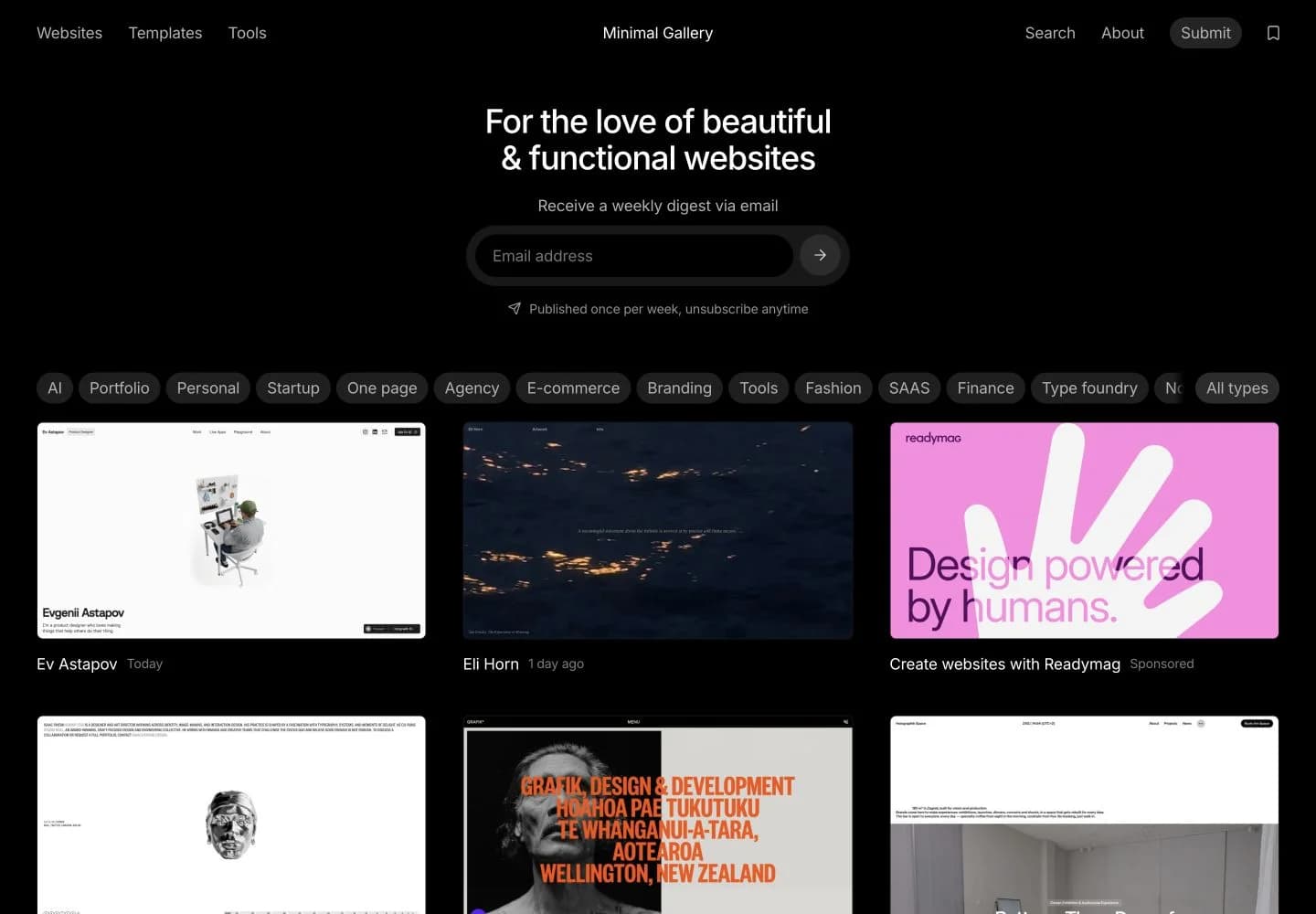
The decision to borrow: Minimal Gallery makes the website itself the preview. Similar-size screenshots support visual comparison, while tags such as Portfolio and E-commerce help visitors narrow their search. Cards distinguish details from visiting the original site. The collection works as a browsing tool because entries share a format.
Your first version
- Choose a narrower collection: for example, 20 architecture-practice portfolios, each selected for a specific reason. Collect the examples before designing empty cards.
- One browse page: give every entry a screenshot, practice name, source link, and a sentence about what to inspect. Add two useful filters, such as project type and navigation pattern.
- Selection and corrections: explain the inclusion criteria and provide a way to report a dead link or suggest an example. Review submissions yourself initially.
Leave out: accounts, public voting, and automatic submissions. Those add moderation work before you know whether the collection helps. Check it:ask a designer with a real brief to shortlist three references and explain why. If all your notes say “clean and modern,” the directory is adding little beyond the images.
4. A recipe library built around a cooking constraint
Build for: someone deciding what they can cook with limited ingredients, equipment, or time. A focused collection, such as one-pan dinners for two, gives them a reason to use your site instead of another general recipe feed.
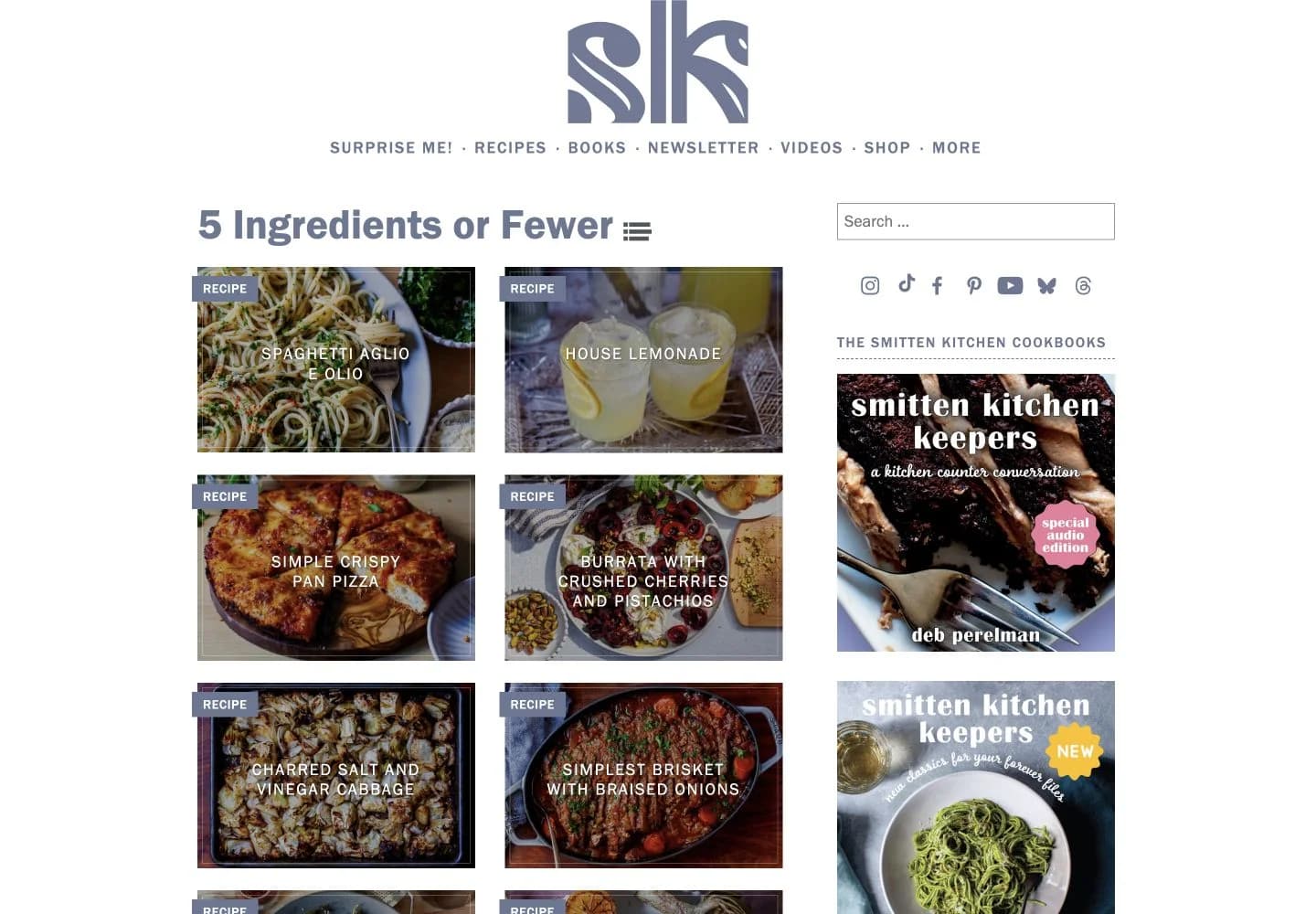
The decision to borrow: Smitten Kitchen's index includes useful constraints such as Budget, Quick, and 5 Ingredients or Fewer alongside cuisine and ingredient categories. The photographed category above can also be viewed as a list. This gives a returning cook a route to something suitable without depending on publication order.
Your first version
- A collection of 12 recipes you have cooked: use your own photos and notes. For a one-pan collection, record the pan type and size, servings, active time, and total time.
- Browse and recipe pages: filter by main ingredient and total time; show these fields on cards. On each recipe page, put quantities, equipment, and ordered steps together.
- Cooking access: add a jump-to-recipe link if there is an introduction, plus a print layout that keeps ingredients and steps together.
The hard part: the instructions must survive another person cooking from them. A good photograph cannot fill in an omitted oven temperature or pan size. Start without accounts, ratings, or a meal-planning subscription. Check it: ask another cook to choose a dinner within their time limit, then follow it. Record where they need to ask you a question and fix those gaps.
5. A time-zone tool for a recurring scheduling problem
Build for: a small remote team repeatedly coordinating the same cities. They need to compare everyone's local time and date, rather than calculate offsets in their heads or exchange screenshots of separate clocks.
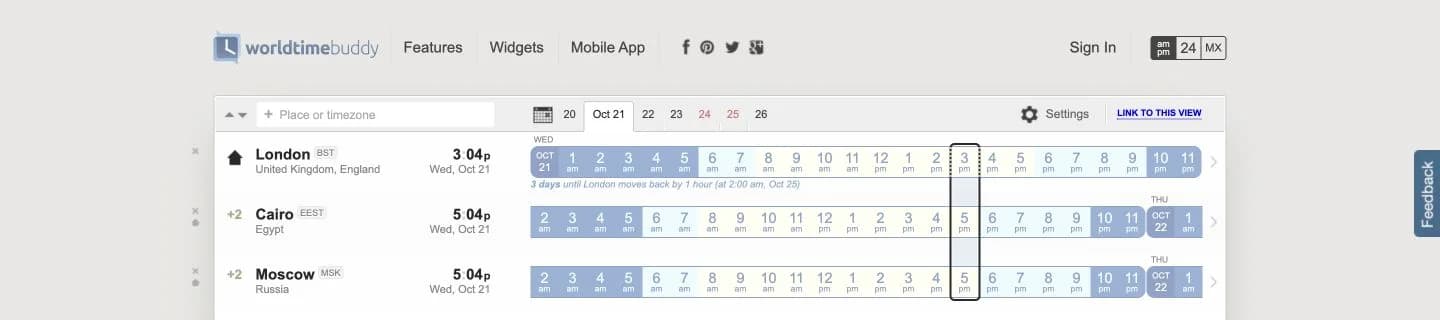
The decision to borrow: World Time Buddy aligns the cities on a shared timeline. Day and night shading makes inconvenient hours visible, while the date selector allows planning beyond today. In this capture, London also has an upcoming clock-change notice. The useful visual is the alignment: it turns several separate numbers into a comparison.
Your first version
- One screen: start with the team's three named cities, a meeting date, and a selected time in a clearly identified home city.
- Aligned results: show each city's local date and time, with working-hour labels and shading. Keep text labels so color is not the only signal.
- Copy the result: produce a short meeting summary containing the date, time, and zone for every city. Add a shareable selection only after the calculation is correct.
The implementation boundary: use named IANA zones, such as Europe/London, with a maintained time-zone implementation; do not encode London as a permanent UTC offset. Calendar connections and logins can wait. Check it: verify winter and summer dates, a meeting that falls on the next day elsewhere, and dates around clock changes. For a skipped or repeated local hour, the interface must ask the user to resolve it rather than silently choose a different meeting time.
6. An event site that stays useful after the event
Build for: a small workshop, meetup, or conference with details scattered across messages. Attendees need one reliable place for the date, venue, program, and registration status; afterward, they need the materials.
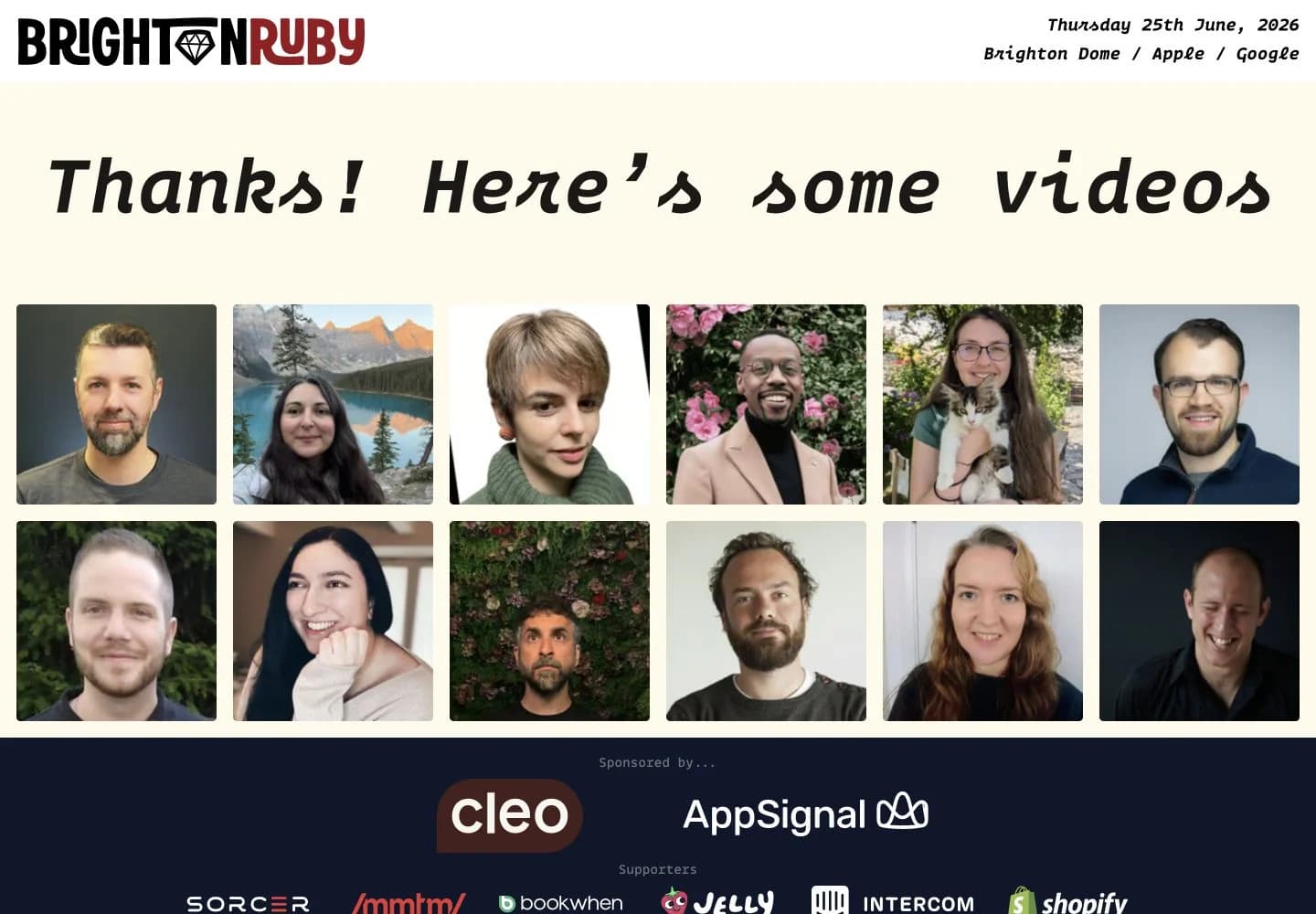
The decision to borrow: Brighton Ruby keeps the date and venue, including map links, at the top. At the time of this review, its June 2026 event has ended and the main invitation points to videos. Earlier years remain available too. The page has a job after ticket sales end, and its main action changes to match that job.
Your first version
- One event page: give the audience, topic, date including year, local time, venue, directions, access information, and an organizer contact.
- A short schedule: list session times and what people will do or learn. Link to the registration service you already use, showing the real capacity or sold-out state.
- An after-event update: replace registration with slides, recordings where available, and the next confirmed date. Keep the old event clearly dated.
Leave out: custom ticket payments and attendee social profiles. Assign someone to update cancellations and close registration. Check it: ask a first-time attendee to work out when to leave home, where to arrive, and how to register. Then check the page again after the event: the main button should still lead somewhere useful.
7. A local repair directory with information people can act on
Build for: residents with a broken item who need to find a nearby service that actually handles it. A map of every business in town is less helpful than knowing who repairs sewing machines within a practical travel distance.
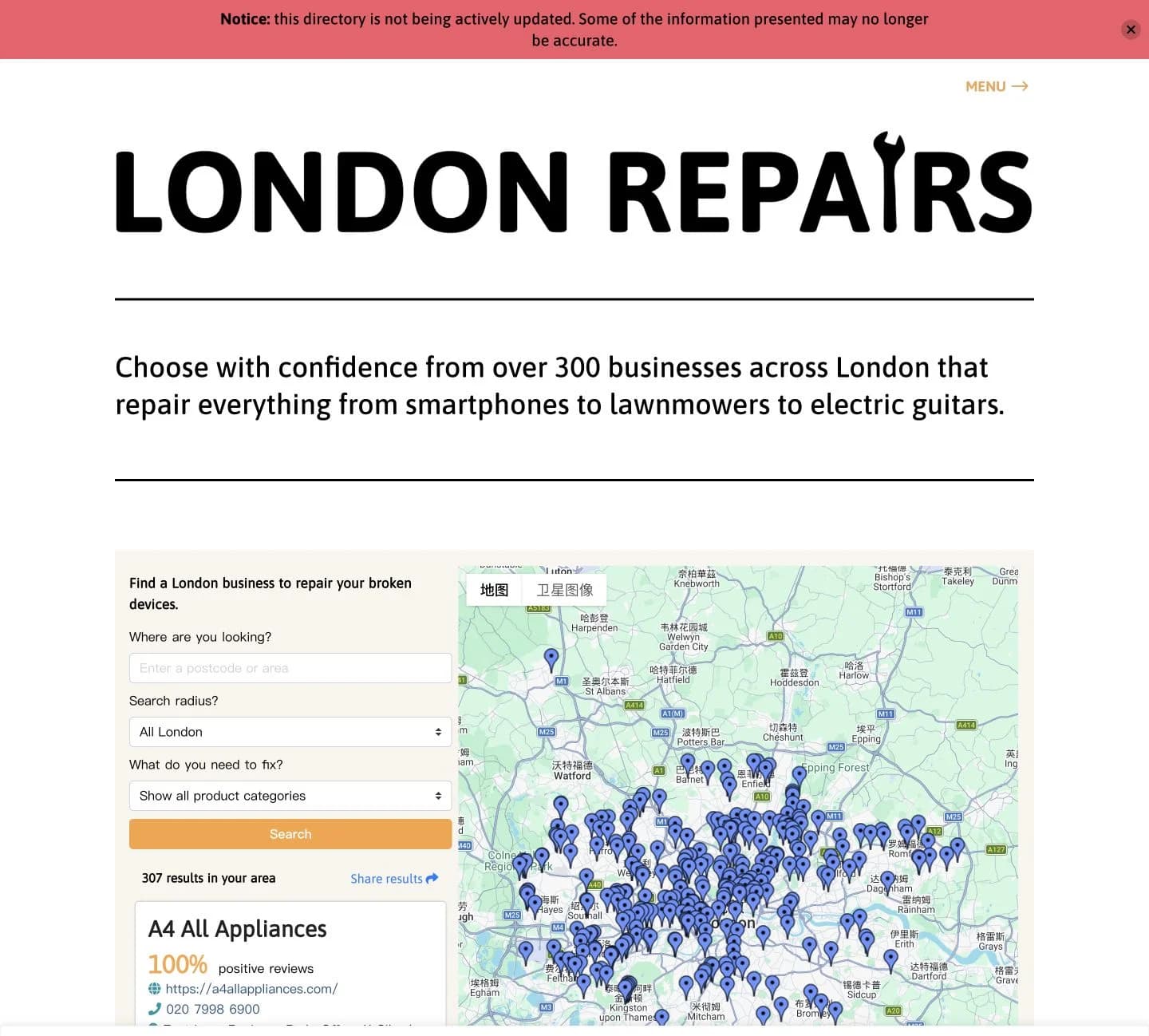
The decision to borrow: London Repairs asks for an area, search radius, and the type of device. Its listings expose contact details beside the map, giving the visitor a next action. It also currently warns that it is not actively updated. That is a useful lesson for your scope: collecting listings once is not enough to keep a local service useful.
Your first version
- Cover one district and two repair categories: start with ten businesses you can verify. Record accepted items, address, contact method, source, and last-checked date.
- A list with category and neighborhood filters: each result should explain what the business repairs and link to contact and directions. Add a map only if visitors need it to choose.
- A correction route: let readers report a closure or wrong category. Recheck those reports and schedule regular listing reviews; mark unconfirmed information clearly.
Leave out: scraped review scores and a nationwide launch. Ten current listings can serve a neighborhood better than hundreds you cannot check. Check it: ask a resident to find a service for a specific broken item. Can they identify a plausible provider and confirm it accepts that item? Track that outcome separately from a map view or a telephone-link click.
Turn one idea into a buildable brief
Pick the case for which you can supply real content and reach real users. Before choosing a builder, write the audience, their task, the first pages, the information each page needs, and who will maintain it. Here is a concrete starting brief for the restaurant idea:
Build a mobile-first website for our single-location café. Visitors need to choose food, check when we are open, and get directions. Create a home page with hours, address, phone, and our existing booking link, plus a text menu page with dishes and prices. Use the menu and photos I supply. Ask me for missing prices, holiday hours, and booking rules before filling them in. Show the mobile layouts for review before implementing them. Leave out accounts, delivery ordering, and payments. The owner must be able to update the menu and opening hours without editing the layout.
Agree on that scope, then review the page layouts before writing the full implementation. Our step-by-step AI building guide covers the project folder, PRD, technical plan, UI review, and launch sequence. If you need visual direction, use the website design case studies to choose a specific pattern for the visitor's task.
A visual site builder or CMS is a practical fit for content pages. If you prefer discussing the brief aloud while reviewing a live preview, SayCraft's meeting workflow is another option. Whichever tool you choose, finish by giving someone the actual task: choose a project, plan a visit, find a recipe, or compare a meeting time. Their next point of confusion tells you what to improve.
Frequently asked questions
What is a good website idea for beginners?
A portfolio with three substantial projects or a one-location business information site is a manageable start if you already have the content. Both can work without accounts or payments. Choose a visitor task you can test, such as finding relevant work and sending an inquiry, rather than starting with a list of features.
How do I know whether my website idea is useful?
Find people who already face the problem and ask how they solve it today. Give them a small version with real information and one realistic task. Watch whether they finish without help and what they still need to check elsewhere. A directory visit or a button click alone does not prove that someone found a suitable service.
Which website ideas could support a business?
A portfolio can bring qualified inquiries for an existing service; a restaurant site can help customers choose and visit. A directory needs useful coverage and repeat demand before sponsorship is a credible offer. Choose a specific customer and offer first; adding advertising to a generic list does not create demand.
Can I build these websites without coding?
Portfolios, event pages, menus, and small curated collections can use a visual site builder or CMS. AI can help implement a more custom interface. Time-zone calculations, forms, and filters still need verification with real inputs; a working-looking preview is only the starting point.